# Creating Payload Formatters
> This section explains how to set up Payload Formatters using the Console or CLI.
Source: https://www.thethingsindustries.com/docs/integrations/payload-formatters/create/
This section explains how to set up Payload Formatters using the Console or CLI.
**Console:**
## Create an Application Payload Formatter in the Console
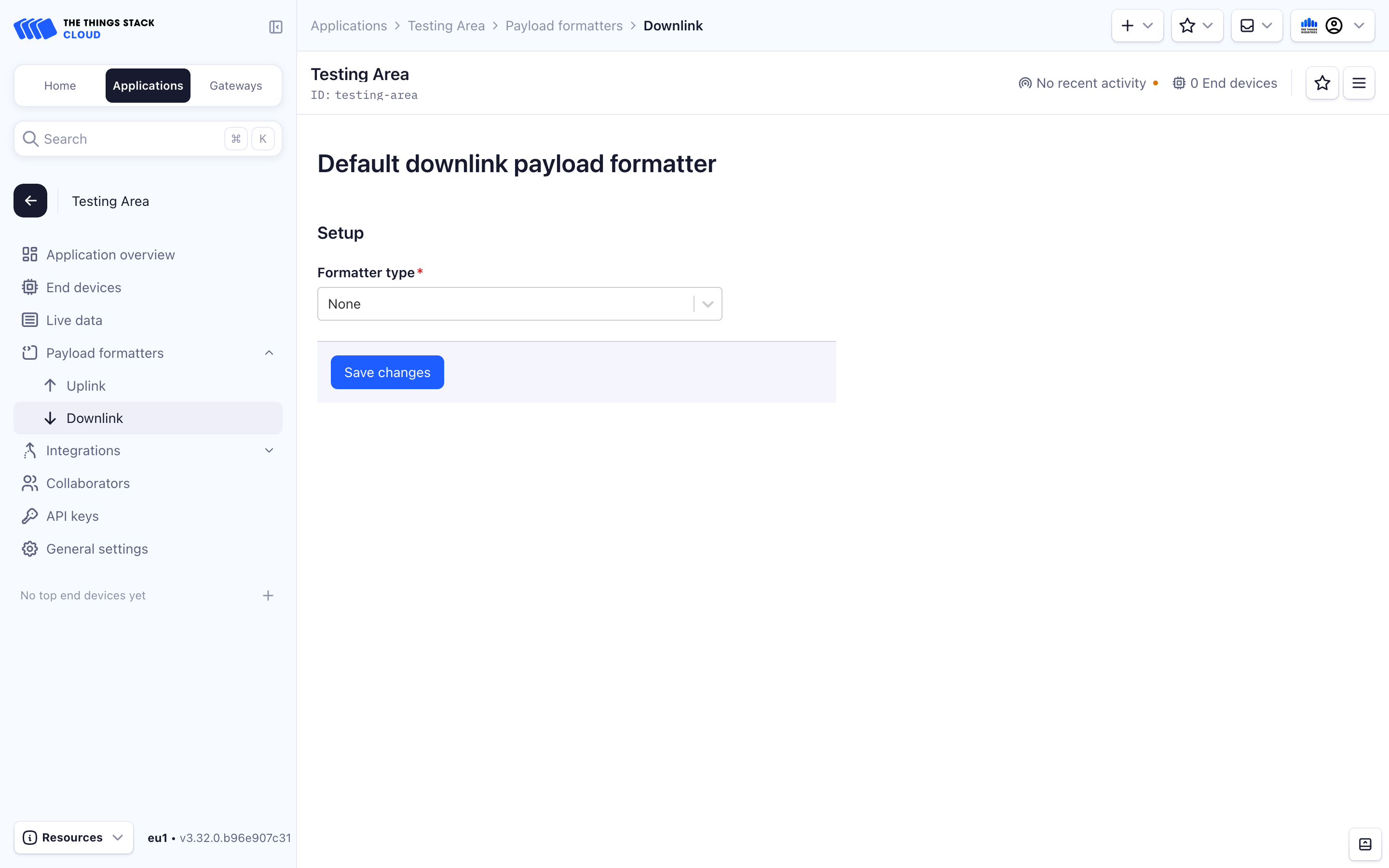
To create an Application payload formatter, navigate to the **Applications** tab and choose your application.
Within the **Application Overview**, select the **Payload Formatters** dropdown in the left menu.
Choose **Uplink** or **Downlink**.
Choose a **Formatter type**.
See the [Javascript](https://www.thethingsindustries.com/docs/integrations/payload-formatters/javascript/), [CayenneLPP](https://www.thethingsindustries.com/docs/integrations/payload-formatters/cayenne/), and [Device Repository](https://www.thethingsindustries.com/docs/integrations/payload-formatters/device-repo/) payload formatter documentation for an explanation of the diffent types of payload formatters.
## Create a Device Specific Payload Formatter
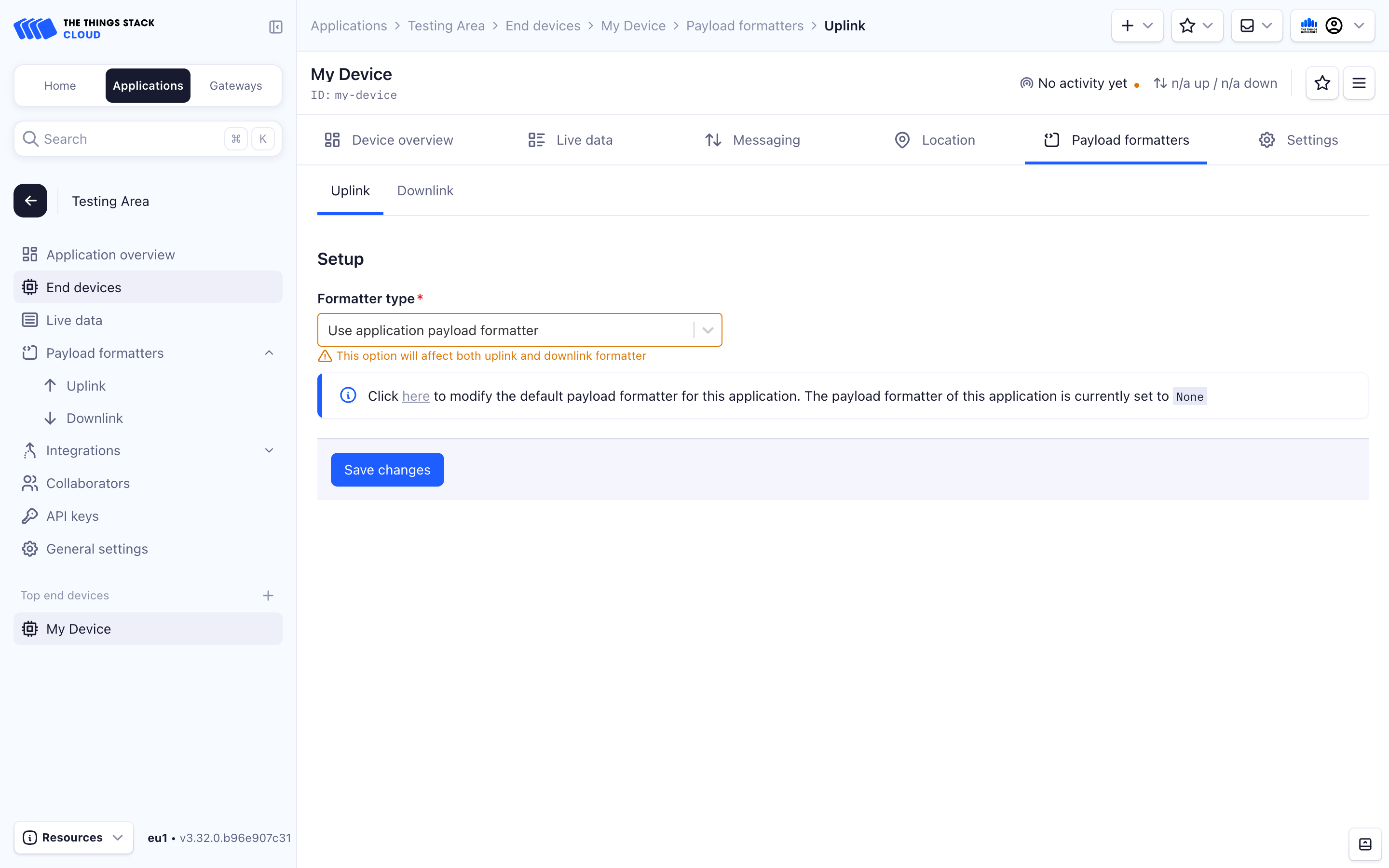
To create a device specific payload formatter, navigate to the **Applications** tab. Choose your application.
Within the **Application Overview**, select **End Devices** in the left menu.
Choose your **End Device**.
Within the **End Device Overview**, select the **Payload Formatters** tab in the top menu.
Choose **Uplink** or **Downlink**.
Choose a **Formatter type**.
See the [Javascript](https://www.thethingsindustries.com/docs/integrations/payload-formatters/javascript/), [CayenneLPP](https://www.thethingsindustries.com/docs/integrations/payload-formatters/cayenne/), and [Device Repository](https://www.thethingsindustries.com/docs/integrations/payload-formatters/device-repo/) payload formatter documentation for an explanation of the diffent types of payload formatters.
**CLI:**
We define some user parameters that will be used below:
```bash
APP_ID="app1"
API_KEY="NNSXS.VEEBURF3KR77ZR.."
GTW_EUI="00800000A00009EF"
USER_ID="admin"
```
Make sure to modify these according to your setup.
## Create an Application Payload Formatter using the CLI
To create an application specific payload formatter, use the following command when linking an application. If creating a [Javascript payload formatter](https://www.thethingsindustries.com/docs/integrations/payload-formatters/javascript/), save your `Encoder` and `Decoder` functions to files and load them using the `formatter-parameter-local-file` parameter:
```bash
ttn-lw-cli applications link set $APP_ID \
--api-key $API_KEY
--default-formatters.down-formatter FORMATTER_JAVASCRIPT \
--default-formatters.down-formatter-parameter-local-file "encoder.js" \
--default-formatters.up-formatter FORMATTER_JAVASCRIPT \
--default-formatters.up-formatter-parameter-local-file "decoder.js"
```
To create a [CayenneLPP](https://www.thethingsindustries.com/docs/integrations/payload-formatters/cayenne/) or [Device Repository](https://www.thethingsindustries.com/docs/integrations/payload-formatters/device-repo/) application payload formatter, use the `FORMATTER_CAYENNELPP` or `FORMATTER_DEVICEREPO` constants. No `formatter-parameter-local-file` parameter is needed.
## Create a Device Specific Payload Formatter
We first define some device-related user parameters:
```bash
DEVICE_ID="dev1-with-formatter"
DEV_EUI="0004A30B001C0530"
APP_EUI="800000000000000C"
FREQUENCY_PLAN="EU_863_870"
APP_KEY="752BAEC23EAE7964AF27C325F4C23C9A"
LORAWAN_VERSION="1.0.3"
LORAWAN_PHY_VERSION="1.0.3-a"
```
Make sure you modify these according to your setup.
It is possible to assign a device specific payload formatter when creating a device using the CLI. Use the following parameters during device creation, and if creating a [Javascript payload formatter](https://www.thethingsindustries.com/docs/integrations/payload-formatters/javascript/), save your `Encoder` and `Decoder` functions to files and load them using the `formatter-parameter-local-file` parameter:
```bash
ttn-lw-cli end-devices create $APP_ID $DEVICE_ID \
--dev-eui $DEV_EUI \
--app-eui $APP_EUI \
--frequency-plan-id $FREQUENCY_PLAN \
--root-keys.app-key.key $APP_KEY \
--lorawan-version $LORAWAN_VERSION \
--lorawan-phy-version $LORAWAN_PHY_VERSION \
--formatters.down-formatter FORMATTER_JAVASCRIPT \
--formatters.down-formatter-parameter-local-file "encoder.js" \
--formatters.up-formatter FORMATTER_JAVASCRIPT \
--formatters.up-formatter-parameter-local-file "decoder.js"
```
To create a [CayenneLPP](https://www.thethingsindustries.com/docs/integrations/payload-formatters/cayenne/) or [Device Repository](https://www.thethingsindustries.com/docs/integrations/payload-formatters/device-repo/) device payload formatter, use the `FORMATTER_CAYENNELPP` or `FORMATTER_DEVICEREPO` constants. No `formatter-parameter-local-file` parameter is needed.
## Edit a Device Specific Payload Formatter
To change the payload formatter for an existing device, use the `end-devices update` command:
```bash
ttn-lw-cli end-devices set $APP_ID $DEVICE_ID \
--formatters.down-formatter FORMATTER_JAVASCRIPT \
--formatters.down-formatter-parameter-local-file "encoder.js" \
--formatters.up-formatter FORMATTER_JAVASCRIPT \
--formatters.up-formatter-parameter-local-file "decoder.js"
```
To unset the payload formatters, use the `--unset` flag. The command below will unset all device specific payload formatters:
```bash
ttn-lw-cli end-devices set $APP_ID $DEVICE_ID \
--unset "formatters"
```
It is also possible to unset the uplink or downlink formatters separately:
```bash
ttn-lw-cli end-devices set $APP_ID $DEVICE_ID \
--unset "formatters.up-formatter,formatters.up-formatter-parameter"
```
**HTTP (REST) API:**
## Create an Application Payload Formatter
###### Details
| Item | Value |
| ------------ | ------------------------------------------------------------------------------------------------------------------------------------------------------------ |
| Endpoint | [`/as/applications/{application_ids.application_id}/link`](https://www.thethingsindustries.com/docs/api/reference/http/routes/#asapplications{application_ids.application_id}link-put) |
| Request type | `PUT` |
###### Example
To set a payload formatter for an application `my-test-app` on `thethings.example.com`, first create a JSON file named `req.json` in the same folder with the following example contents.
Make sure properly encode the JavaScript functions.
```json
{
"link": {
"default_formatters": {
"up_formatter": "FORMATTER_JAVASCRIPT",
"up_formatter_parameter": "function decodeUplink(input) {\n return {\n data: {\n bytes: input.bytes\n },\n warnings: [],\n errors: []\n };\n}",
"down_formatter": "FORMATTER_JAVASCRIPT",
"down_formatter_parameter": "function encodeDownlink(input) {\n return {\n bytes: [],\n fPort: 1,\n warnings: [],\n errors: []\n };\n}\n\nfunction decodeDownlink(input) {\n return {\n data: {\n bytes: input.bytes\n },\n warnings: [],\n errors: []\n }\n}"
}
},
"field_mask": {
"paths": [
"default_formatters.up_formatter",
"default_formatters.up_formatter_parameter",
"default_formatters.down_formatter",
"default_formatters.down_formatter_parameter"
]
}
}
```
```bash
curl -X PUT -H "Content-Type: application/json" -H "Authorization: Bearer $API_KEY" \
-d @./req.json \
https://thethings.example.com/api/v3/as/applications/my-test-app/link
{"default_formatters":{"up_formatter":"FORMATTER_JAVASCRIPT","up_formatter_parameter":"function decodeUplink(input) {\n return {\n data: {\n bytes: input.bytes\n },\n warnings: [],\n errors: []\n };\n}","down_formatter":"FORMATTER_JAVASCRIPT","down_formatter_parameter":"function encodeDownlink(input) {\n return {\n bytes: [],\n fPort: 1,\n warnings: [],\n errors: []\n };\n}\n\nfunction decodeDownlink(input) {\n return {\n data: {\n bytes: input.bytes\n },\n warnings: [],\n errors: []\n }\n}"}}
```
## Create a Device Specific Payload Formatter
###### Details
| Item | Value |
| ------------ | ------------------------------------------------------------------------------------------------------------------------------------------------------------ |
| Endpoint | [`/as/applications/{application_ids.application_id}/link`](https://www.thethingsindustries.com/docs/api/reference/http/routes/#asapplications{application_ids.application_id}link-put) |
| Request type | `PUT` |
###### Example
To set a payload formatter for an end device `my-test-device` on application `my-test-app` on `thethings.example.com`, first create a JSON file named `req.json` in the same folder with the following example contents.
Make sure properly encode the JavaScript functions.
```json
{
"link": {
"default_formatters": {
"up_formatter": "FORMATTER_JAVASCRIPT",
"up_formatter_parameter": "function decodeUplink(input) {\n return {\n data: {\n bytes: input.bytes\n },\n warnings: [],\n errors: []\n };\n}",
"down_formatter": "FORMATTER_JAVASCRIPT",
"down_formatter_parameter": "function encodeDownlink(input) {\n return {\n bytes: [],\n fPort: 1,\n warnings: [],\n errors: []\n };\n}\n\nfunction decodeDownlink(input) {\n return {\n data: {\n bytes: input.bytes\n },\n warnings: [],\n errors: []\n }\n}"
}
},
"field_mask": {
"paths": [
"default_formatters.up_formatter",
"default_formatters.up_formatter_parameter",
"default_formatters.down_formatter",
"default_formatters.down_formatter_parameter"
]
}
}
```
```bash
curl -X PUT -H "Content-Type: application/json" -H "Authorization: Bearer $API_KEY" \
-d @./req.json \
https://thethings.example.com/api/v3/as/applications/my-test-app/devices/my-test-device
{"ids":{"device_id":"my-test-device","application_ids":{"application_id":"my-test-app"}},"created_at":"2024-01-10T14:11:53.817139Z","updated_at":"2024-01-10T14:11:53.817139Z","formatters":{"up_formatter":"FORMATTER_JAVASCRIPT","up_formatter_parameter":"function decodeUplink(input) {\n return {\n data: {\n bytes: input.bytes\n },\n warnings: [],\n errors: []\n };\n}","down_formatter":"FORMATTER_JAVASCRIPT","down_formatter_parameter":"function encodeDownlink(input) {\n return {\n bytes: [],\n fPort: 1,\n warnings: [],\n errors: []\n };\n}\n\nfunction decodeDownlink(input) {\n return {\n data: {\n bytes: input.bytes\n },\n warnings: [],\n errors: []\n }\n}"}}
```